
Learn to Talk to AI Like a Pro – It’s Easier Than You Think!
Hey there! Let’s Talk About AI 🤖
Have you ever used ChatGPT, Google Gemini, or any AI tool and wondered why sometimes it gives you exactly what you need, but other times… not so much?
The secret isn’t the AI. The secret is HOW you ask.
Imagine you’re in a restaurant. If you tell the waiter “I want food,” you might get anything. But if you say, “I’d like a cheese pizza, medium size, with extra olives, no mushrooms,” you’ll get exactly what you want!
That’s what prompt engineering is all about – learning to ask AI the right way so you get the right answers, every single time.
📖What is Prompt Engineering?
Think of prompt engineering as learning the language AI understands best.
The Simple Definition:
Prompt engineering is the skill of writing clear instructions (called “prompts”) that help AI give you better, more useful answers.
A Real-Life Comparison:
| Talking to a Friend | Talking to AI |
| You can say “Help me with homework” and they understand | AI needs specific details |
| Friends know your context (class, teacher, subject) | AI needs you to explain everything |
| Friends can ask “What do you mean?” | AI gives its best guess from what you write |
The Bottom Line: The better your prompt (instruction), the better AI’s answer!
Why Does This Matter to YOU?
As a professional, AI can help you:
✅ Understand difficult situations (like that tricky business problem)
✅ Write better letters, reports, insights and e-mails
✅ Learn to code (yes, even if you’ve never coded before!)
✅ Create presentations and projects
✅ Study more efficiently for the professional courses
But ONLY if you know how to ask the right way!
💬What is a Prompt for AI?
A prompt is simply the message or instruction you give to AI.
Think of it like this:
- When you search Google, you type keywords → That’s a simple prompt
- When you talk to Siri or Alexa, you ask a question → That’s a voice prompt
- When you use ChatGPT, you write detailed instructions → That’s an AI prompt
How Does It Work?
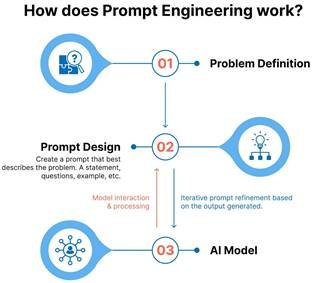
Here’s the process step-by-step:
- 👨 🎓YOU Have a Task or Question
- Example: “I need to write an e-mail about business case for deploying AI Solutions”
- ✍️You Write Your Prompt
- You tell AI exactly what you need: “Write a 300-word business case explaining the background of the problem, potential solution, differentiator with existing solution, expected benefits, leading indicator and lagging indicator.”
- 🤖AI Reads and Understands
- The AI processes your words and figures out what you want
- ⚡ AI Generates Your Answer
- AI creates content based on your instructions
- ✅ You Get Results!
- You receive your business case, benefits case, code, or whatever you asked for!
The Magic Formula:
🛠️What Do You Need for Prompt Engineering?
Good news – you don’t need to be a computer expert or a genius! Here’s what you DO need:
✅ Basic Requirements:
| What You Need | Why You Need It | How to Get It |
| A Computer or Phone | To access AI tools | You probably already have this! |
| Internet Connection | AI tools work online | School, home, mobile broadband or library WiFi |
| An AI Tool Account | To use the AI | Free accounts on ChatGPT, Gemini, or Deepseek etc |
| Clear Thinking | To know what you want | Practice breaking down your tasks |
| Willingness to Learn | Prompting gets better with practice | Just keep trying! |
🆓Free AI Tools Perfect for Students:
- ChatGPT Free – Great for content creation, writing, and explanations
- Google Gemini – Excellent for research and learning
- Bing Chat – Good for finding information with sources
- Perplexity Free – Amazing for research with citations
- Quillbot – Helpful for improving writing
Cost: $0 (Completely FREE!)
💡The Most Important Thing:
You don’t need to be a tech expert. You just need to practice asking clear questions!
📋Prompt Format: The Anatomy of a Perfect Prompt
Just like how a good article has an introduction, body, and conclusion, a good prompt has specific parts too!
The 7 Key Parts (Prompt Anatomy Table)
| Component | What It Is | Why It Matters | Simple Example |
| Instruction | The main task you want AI to do | Tell AI exactly what to do | “Write an email…” |
| Context | Background information and situation details | Helps AI understand the situation | “…about a client project delay…” |
| Examples | Sample outputs showing what you want | Shows AI the pattern to follow | “[Show 1-2 sample emails]” |
| Role/Persona | Who you want the AI to act as | Sets the expertise level and voice | “You are a business consultant with 15+ yrs of experience…” |
| Output Format | How you want the answer structured | Makes output ready to use | “…in 100 words, friendly tone” |
| Constraints | Rules and limits for the AI | Prevents unwanted content | “Do not use difficult words” |
| Tone & Style | The feeling and formality level | Matches the right communication style | “Warm and encouraging” |
🎯Real Example:
BAD PROMPT (Missing most parts):
GOOD PROMPT (Has all the parts):
See the difference? The second prompt gives AI everything it needs to help you perfectly!
🌟Context and Examples: Making AI Understand You Better
What is Context?
Context is like giving AI the full picture of your situation.
- Imagine asking your friend “Should I setup the online training session?”
- Without context, they can’t help much
- With context (“It’s cloudy today and most of the employees working from home”), they can give good advice!
Context and Examples Table
| Element | Type | Description | Example |
| Context | Background Info | Information about what happened before | “We have a major release due next week” |
| Context | Constraints | Rules about what to include or avoid | “Must be suitable for C‑level stakeholders” |
| Context | Situation Details | Current situation and who is involved | “Need to explain to my client managers and C‑level stakeholders why we need more time” |
| Examples | Format Example | Show the structure you want | “Example email: Hi David, I am writing about…” |
| Examples | Style Example | Shows the tone and voice you want | “Example accountable tone: Hi! I want to share a risk we are actively managing… Thank you for your continued partnership” |
| Examples | Pattern Example | Shows the pattern AI should follow | “Input: Reports → Output: deliverable. Now try: Dashboard” |
💡Pro Tip:
Always include:
- What application or module is this for
- Your experience level (so AI uses appropriate language)
- How long should the output be
- What format you need (table, bullet points, code, etc.)
🔧Fine-Tuning and Adapting: Making It Perfect
Sometimes your first prompt doesn’t give you exactly what you need. That’s totally normal! Even experts rarely get it perfect on the first try.
Fine-tuning means making small changes to your prompt to get better results. Think of it like adjusting a recipe – if the cake is too sweet, you use less sugar next time. If AI’s answer is too long, you ask for its shorter next time!
Here’s how to fine-tune your prompts: First, try your prompt and see what you get. Then, look at the result – is it too long? Too short? Too complicated? Too simple? Next, change ONE thing in your prompt to fix that issue. For example, if it’s too complicated, add “explain in simple business terms for C-suite stakeholders.” Finally, try the new prompt and compare. Keep adjusting until you get exactly what you need!
Real Example: Imagine you asked, “summarize the impact of the timeline extension” and got a super complicated answer. Fine-tune it by asking: “summarize the impact of the timeline extension in simple language for a c-suite stakeholder, using business impact, financial impact and impact of our business as well examples like deploying automation are to reduce the review/rework and improving the delivery timeline.” See? You adapted your prompt to get a better result!
Remember: Getting good at prompting is like learning to ride a bike. You’ll wobble at first, but with practice, you’ll be zooming around like a pro! 🚴
💬Multi-Turn Conversations: Talking Back and Forth with AI
You know how sometimes you have a conversation with a friend that goes back and forth? You can do the same with AI! This is called a multi-turn conversation.
Here’s what it means: Instead of asking one question and being done, you can have an ongoing chat with AI, building on each previous response. It’s like having a study buddy who remembers what you were just talking about!
How it works in practice: Let’s say you start with “Explain what RAG in AI is.” AI gives you an answer. Then you can follow up with “Can you give me a simple diagram of that?” or “What would happen if there are multiple source of knowledge within organization?” The AI remembers your previous questions and builds on them. Each question helps you go deeper into the topic, just like a real conversation with a teacher!
Pro tip for students: Use multi-turn conversations when studying! Start broad (“What is World War2?”), then go deeper (“What were the main causes?”), then even deeper (“How did the Treaty of Versailles contribute to the war?”). It’s like having your own personal tutor available 24/7!
Important reminder: If you start a completely new topic, remember AI by saying “Now I want to talk about something different…” so it knows to “forget” the previous conversation and focus on your new question. This keeps things clear and organized!
🎯Types of Prompts: Different Ways to Ask
Just like there are different types of questions in a test (multiple choice, true/false, essay), there are different types of prompts you can use with AI! Let’s explore them:
- Zero-Shot Prompts (The Quick Question)
What it is: Asking AI a direct question without giving any examples or background. It’s like asking “What’s the capital of France?” – you expect AI to just know.
When to use it: Perfect for simple facts, quick definitions, or general knowledge questions. Great for asking (foundational) questions that have clear, factual answers.
Example: “What is RAG (Retrieval-Augmented Generation)?” or “How do you calculate the area of a circle?” or “Who coined the concept of investment horizon?”
Best for: Quick information checks, studying for certification tests, understanding basic concepts, getting simple explanations.
Pro tip: Zero-shot works best when you need factual answers, not creative or complex explanations. If the answer you get isn’t detailed enough, try one of the other prompt types below!
- Few Shot Prompts (Show, Then Ask)
What it is: Giving AI 2-3 examples FIRST, then asking it to do the same thing. It’s like showing someone how to solve a business economics problem, then asking them to solve a similar one.
When to use it: When you need AI to follow a specific pattern or style. Perfect for writing assignments where you want a particular format!
Example:
Best for: Writing in a specific style, following a pattern, creating consistent content (like definition sentences), understanding by example.
Pro tip: The examples you give AI are super important! Make sure they’re exactly the style/format you want your final answer to be!
- Chain-of-Thought Prompts (Think Step-by-Step)
What it is: Asking AI to show its thinking process, step by step. Like how your math teacher wants you to “show your work,” you ask AI to show its work too!
When to use it: For math problems, science experiments, complex reasoning, or whenever you need to understand HOW to solve something, not just the answer.
Example:
Best for: Math calculations, word problems, business problem-solving, understanding difficult concepts, learning the process (not just the answer).
Pro tip: This is AMAZING for learning! When AI shows you each step, you understand the concept instead of just copying an answer. Your stakeholders, teams and client will notice the difference!
- Role-Based Prompts (Asking an Expert)
What it is: Telling AI to act like a specific person or expert. Like saying “Pretend you’re my Quality Auditor” or “Act like you’re an Improvement coach.”
When to use it: When you want AI to speak in a certain way or use specific expertise. Great forgetting explanations at the right level!
Example:
Best for: Getting explanations in the right tone, learning from an “expert,” practicing conversations (like job interviews), creative writing (character dialogue).
Pro tip: Try different roles! Ask AI to be a patient tutor, an enthusiastic coach, a wise teacher – the personality changes how the information is presented!
- Instruction-Based Prompts (Clear Commands)
What it is: Giving AI very clear, specific instructions about exactly what to do. Like a recipe with step-by-step directions.
When to use it: When you need something specific in a particular format – essays, code, lists, summaries.
Example:
Best for: Structured assignments, coding projects, organized content, meeting specific requirements (like word counts or formats).
Pro tip: The more specific your instructions, the better! Think about all the requirements your teacher gives you for assignments – use those same details with AI!
📚Use Cases and Examples: How YOU Can Use Prompt Engineering
Now let’s see how students like you USE prompt engineering in real life! Here are 11 different ways:
- Language and Text Generation 📝
| Type | What it is | Example | Best tools | Prompt template | Who uses this |
| Creative Story Writing | Using AI to help write stories for English class or just for fun | “Write a 200-word adventure story about a student who discovers a magical library that brings book characters to life” | ChatGPT Free, Google Gemini (both free!) | “Write a [length] story about [topic] with [elements]. Make it [tone].” | Students with creative writing assignments, young writers, English class projects |
| Essay and Article Writing | Getting help structuring and writing essays for class | “Write a 500-word essay on climate change for 9th grade science class. Include introduction, 3 main points with evidence, and conclusion.” | ChatGPT Free, Google Gemini, Quillbot | “Write a [word count] [type] on [topic] for [audience]. Include [sections].” | All students! Perfect for homework, projects, and learning essay structure |
| Email Writing | Composing emails to teachers, for group projects, or formal communications | “Write a friendly email to my teacher requesting a project deadline extension because I was sick for 3 days” | ChatGPT Free, Gemini | “Write a [tone] email to [recipient] about [topic]. Keep it [length].” | Students, anyone who sends emails professionally |
- Question Answering 🤔
| Type | What it is | Example | Best tools | Prompt template | Who uses this |
| Homework Help | Getting difficult concepts explained in simple language you can understand | “Explain photosynthesis to me like I am a 9th grader. Use the example of how humans eat food for energy.” | Perplexity Free, Google Gemini, Bing Chat (all free!) | “Explain [concept] in simple terms for [grade level]. Use examples.” | Students doing homework, parents helping kids, anyone learning new topics |
| Research Questions | Getting detailed answers with sources for school projects | “What are the main causes of World War 2? Provide at least 5 causes with brief explanations. Cite your sources.” | Perplexity Free, Bing Chat (they give sources!) | “What are [question]? Provide [detail level] and cite sources.” | Students doing research papers, curious learners, anyone needing reliable information |
- Code Generation 💻
| Type | What it is | Example | Best tools | Prompt template | Who uses this |
| Simple Code Writing | Creating basic programs for computer science class or personal projects | “Write Python code to calculate the area of a circle. Add comments explaining each step in simple language.” | ChatGPT Free, Google Gemini, Replit | “Write [language] code to [task]. Add comments and explain each step.” | Students learning to code, beginner programmers, kids interested in technology |
| Code Debugging Help | Finding and fixing errors in your code when it doesn’t work | “Debug this Python code and explain what was wrong: [paste your code here]” | ChatGPT Free, Gemini | “Debug this [language] code: [code]. Explain the error and fix it.” | Coding students, beginner programmers, anyone learning programming |
- Image Generation 🎨
| Type | What it is | Example | Best tools | Prompt template | Who uses this |
| School Project Images | Creating images and diagrams for presentations and projects | “Create an image of the solar system with all 8 planets labeled clearly, realistic style, educational” | Bing Image Creator, Craiyon, Leonardo.ai (all free!) | “Create an image of [subject] with [details]. Style: [style type].” | Students making presentations, teachers creating materials, project creators |
| Creative Art and Design | Making artistic images for posters, cards, or creative projects | “Create a colorful poster design about saving water with cartoon style, showing kids turning off taps and plants being watered” | Bing Image Creator, Canva AI | “Create a [style] image about [topic] with [elements]. Make it [mood].” | Students, young artists, designers, anyone doing creative projects |
- Audio Generation 🎙️
| Type | What it is | Example | Best tools | Prompt template | Who uses this |
| Podcast and Voice Projects | Creating voice narration for presentations or podcast projects | “Narrate my science project about volcanoes in a clear, educational voice. Make it sound exciting but informative.” | Google Text-to-Speech (free!), Eleven Labs Free Trial | “Narrate: [content]. Voice: [type]. Tone: [emotion].” | Students doing presentations, young podcasters, content creators |
- PPT Generation 📊
| Type | What it is | Example | Best tools | Prompt template | Who uses this |
| Homework Help | Getting difficult concepts explained in simple language you can understand | “Explain photosynthesis to me like I am a 9th grader. Use the example of how humans eat food for energy.” | Perplexity Free, Google Gemini, Bing Chat (all free!) | “Explain [concept] in simple terms for [grade level]. Use examples.” | Students doing homework, parents helping kids, anyone learning new topics |
🌟Strategies for Writing Better Prompts
Now that you know WHAT prompts are and the different TYPES, let’s learn HOW to write good ones! Here are 5 simple strategies:
Strategy 1: 🎯Be Clear and Specific
- What it means: Don’t say vague things like “help me with project report.” Say EXACTLY what you need!
- Bad example: ❌ “Write something about AI “Good example: ✅ “Write a 200-word explanation of AI for Interns joining our data analytics team”
- Why it works: AI is like a super smart robot, but it can’t read your mind! The clearer you are, the better it helps you.
- Tip: Pretend you’re explaining what you need to a friend who knows nothing about your assignment. Include all the details!
Strategy 2: 📚Give Context
- What it means: Explain the situation – what team/function is this for? What’s your skill or expertise level? Why do you need this?
- Good example: “For my project status report due Friday, I need a creative executive summary as storytelling. My process champion wants us to practice descriptive writing and use metaphors which are commonly used in our function and business domain.”
- Why it works: Context helps AI understand not just WHAT you want, but WHY you want it and WHO it’s for.
- Tip: Always mention your skill/experience/expertise level so AI uses language you’ll understand!
Strategy 3: 💡Show Examples
- What it means: Give AI 1-2 examples of what you’re looking for. Show don’t just tell!
- Good example: “Write sentences like these: Example 1: The sunset painted the sky orange and pink. Example 2: Raindrops danced on the windowpane. Now write 3 more descriptive sentences about nature.”
- Why it works: Examples teach AI the exact style, format, and tone you want.
- Tip: Use examples from your textbook or past assignments to show AI what your teacher expects!
Strategy 4: 📝Set the Format
- What it means: Tell AI exactly HOW you want the answer – how long, what style, what structure.
- Good example: “Give me 5 bullet points, each 1-2 sentences, in simple language suitable for 9thgraders”
- Why it works: If you don’t specify format, AI might give you a long paragraph when you want a short list!
- Tip: Include word counts, number of paragraphs, and any special formatting your teacher requires.
Strategy 5: 🔄Test and Improve
- What it means: Try your prompt. If it doesn’t work perfectly, change it and try again!
- How to do it:Try your first prompt Look at what AI gave you Identify what’s wrong (too long? too complicated? wrong tone?) Change ONE thing in your prompt Try again!
- Why it works: Even experts rarely get perfect results on the first try. Testing helps you learn what works!
- Student tip: Save your good prompts in a notebook! When you find one that works well, you can use it again for similar assignments.
🎓Putting It All Together: Your Action Plan
Okay, now you know everything about prompt engineering! But where do you start? Here’s your simple action plan:
This Week: Getting Started 🚀
- Day 1-2: Create a free account on ChatGPT or Google Gemini
- Day 3-4: Try 5 simple prompts about topics you’re studying
- Day 5-6: Practice the “anatomy” – add context, examples, and format to your prompts
- Day 7: Test your new skills on real homework!
Next Week: Level Up! ⬆️
- Try different prompt types (zero-shot, few-shot, chain-of-thought)
- Keep a “prompt journal” – save what works!
- Help a friend with their homework using AI
- Use AI for a complete assignment (with teacher permission!)
Become a Prompt Pro! 🌟
- Create your own library of good prompts for different subjects
- Teach your friends and family how to use AI effectively
- Share your best tips and examples
- Keep learning – AI gets better every day!
⚠️Important Reminders for Students
✅ DO:
- Use AI to HELP you learn and understand
- Always review and edit what AI gives you
- Ask your teacher if using AI is okay for assignments
- Use AI to explain difficult concepts
- Practice and get better at prompting
❌ DON’T:
- Copy AI answers without understanding them
- Submit AI work as 100% your own without disclosure
- Use AI for tests or quizzes (that’s cheating!)
- Believe everything AI says without checking
- Give AI personal information about yourself
🎯The Right Way to Use AI:
Think of AI as a super-smart study buddy, not someone to do your homework FOR you. Use it to understand better, learn faster, and create better work – but the thinking should still be YOURS!
🚀Ready to Get Started?
Want to become a Prompt Engineering expert?
Join Our AI Prompt Engineering Foundation Course!
Perfect for: Students (9th grade and up), Teachers, Parents, Anyone curious about AI
What you’ll learn:
✅ All types of prompts with practice exercises
✅ Real examples for homework, projects, and studying
✅ How to use AI responsibly and ethically
✅ Hands-on projects you can use in school
✅ Certificate of completion for your resume
💬Let’s Talk!
Questions? Drop them in the comments! I read and reply to everyone.
Found this helpful?
- 💾Save this post for later
- 🔄Share with friends who could use AI help
- 👍Like if you learned something new
- 💭Comment with your first prompt attempt!
📚Quick Reference: Your Prompt Cheat Sheet
The Perfect Prompt Formula:
🌟Final Thoughts
Learning prompt engineering is like learning a new language – the language of AI! And just like learning Spanish or French, it takes practice. But here’s the cool part: You’re already ahead of most adults just by reading this!
AI is the future and knowing how to communicate with it is going to be one of the most valuable skills you can have. Whether you want to be a scientist, artist, programmer, writer, or anything else – AI can help you get there faster.
So, start today. Try one prompt. Then try another. And another.
Before you know it, you’ll be the person your friends ask for help – “Hey, how did you get such good answers from ChatGPT?” And you’ll know the secret: It’s all about the prompt!
#PromptEngineering #AIForStudents #StudentLife #StudyTips #ChatGPT #AITools #HomeworkHelp#9thGrade #HighSchool #LearnAI #EdTech #FutureSkills #StudentSuccess #AILearning#TechForTeens #SmartStudying #DigitalLiteracy #STEMEducation #CreativeWriting #CodingForKids
Remember: The best time to start learning prompt engineering was yesterday. The second-best time is RIGHT NOW! 🚀
Drop a 👍if you’re ready to become a Prompt Engineering Pro!